
Report App Bug / Crash Log
Something broke? Record exactly what happened and send it to Aadil, so it can be fixed faster.
What this is and why it helps
Crash Log is a small tool inside Aadil Virtual. It keeps a record of the errors that happen in the app and in the games running inside it. Without a record, a bug like "Google sign-in does not work" is only a guess. With the record, Aadil can see the exact error, on which phone and in which step, and fix the real cause.
Nothing is recorded in the log unless you turn it on, and you decide when to send it. Keys, tokens and links with private data are removed from the log, and e-mail addresses are shortened, for example j***@gmail.com.
How to open it in the app
- Sign inMake sure you are signed in to Aadil Virtual with your Google account.
- Open the More tabIt is the last tab at the bottom of the app.
- Tap Report App Bug / Crash LogThe Crash Log screen opens, like the pictures below.
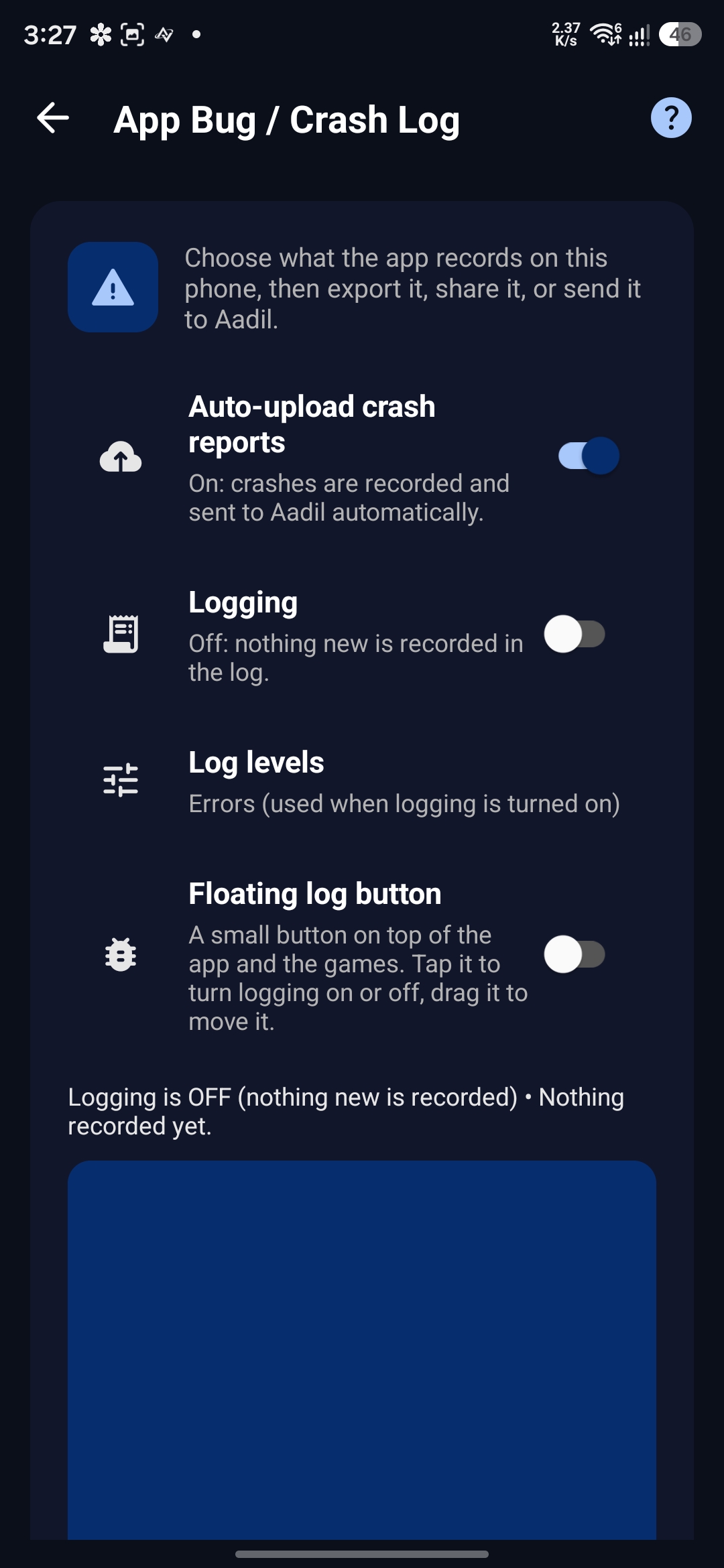
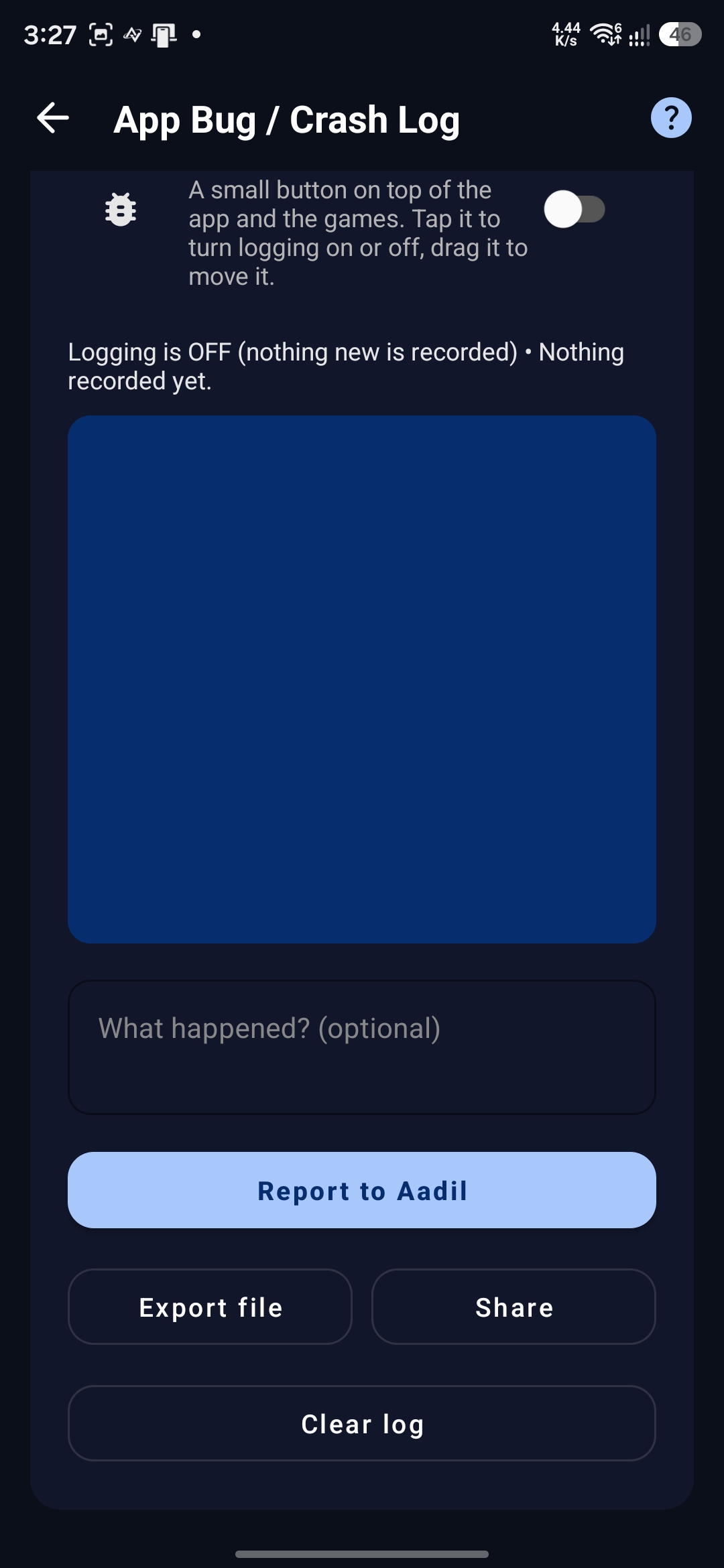
What each option does
Auto-upload crash reports
When a game crashes inside Aadil Virtual, the crash report is sent to Aadil automatically, with the crash details. It is on by default and you can turn it off. It only reports crashes. It does not send errors or warnings.
Logging
Turn it on only when you have a problem you want to record. While it is on, the app writes what happens to a log on your phone, so you can send it to Aadil. Turn it off again when you are done.
Log levels
Chooses what is written to the log: Errors, Warnings, Info, Debug, Verbose (everything) and Google related (sign-in, accounts and launch problems). You can tick more than one. Errors is the default.
Floating log button
Shows a small button on top of the app and the games. Tap it to turn logging on or off at the right moment, and drag it to move it. This is the easiest way to record a bug inside a game.
Report, export, share and clear
- Report to Aadil sends the log straight to Aadil. You can add a note about what happened. If the log is long, only the part that fits is sent. In that case use Export file and send the file instead.
- Export file saves the whole log as a text file on your phone. Share sends that file through any app, for example Telegram or e-mail, so you can send it to Aadil.
- Clear log deletes the saved log.
Always clear the log first, then reproduce the bug. Old lines may still be in the log, and they make it much harder to find the real problem.
How to record a bug the right way
Record only the moment the problem happens. A short, clean log is the most useful log.
Example 1: you cannot add a Google account
- PrepareOpen the Crash Log screen. Tap Clear log, make sure Logging is off and turn on Floating log button.
- Choose the levelOpen Log levels and pick Google related, or tick everything for more detail.
- Start recordingGo to Settings → Manage Google services. When the Add account button shows, tap the floating button first, so logging turns on.
- Reproduce the bugTap Add account, then wait about 5 seconds.
- Stop recordingTap the floating button again to turn logging off.
- Send itGo back to the Crash Log screen, tap Export file and send the file to Aadil.
Example 2: Google login does not work inside a game (for example Among Us)
- PrepareTap Clear log, make sure Logging is off and turn on Floating log button.
- Choose the levelPick Google related, or tick everything for more detail.
- Open the gameLaunch the game from Aadil Virtual and open it up to the login screen.
- Start recordingTap the floating button to turn logging on, then try to log in.
- Stop recordingWhen the login fails, tap the floating button again to turn logging off.
- Send itOpen the Crash Log screen, tap Export file and send the file to Aadil.
Common questions
Does it record everything I do?expand_more
Should I leave logging on all the time?expand_more
Report to Aadil says it could not send.expand_more
Where is the exported file saved?expand_more
Do I need to report crashes myself?expand_more
Need to send it to Aadil?
Send the exported file on Telegram or by e-mail, and tell us what you were doing when the problem happened.